Minggu, 21 April 2019

Feature: The 50 Best Game Boy Games - Zelda, Pokémon, Metroid, Mario And More - Nintendo Life

Top 50 Game Boy Games

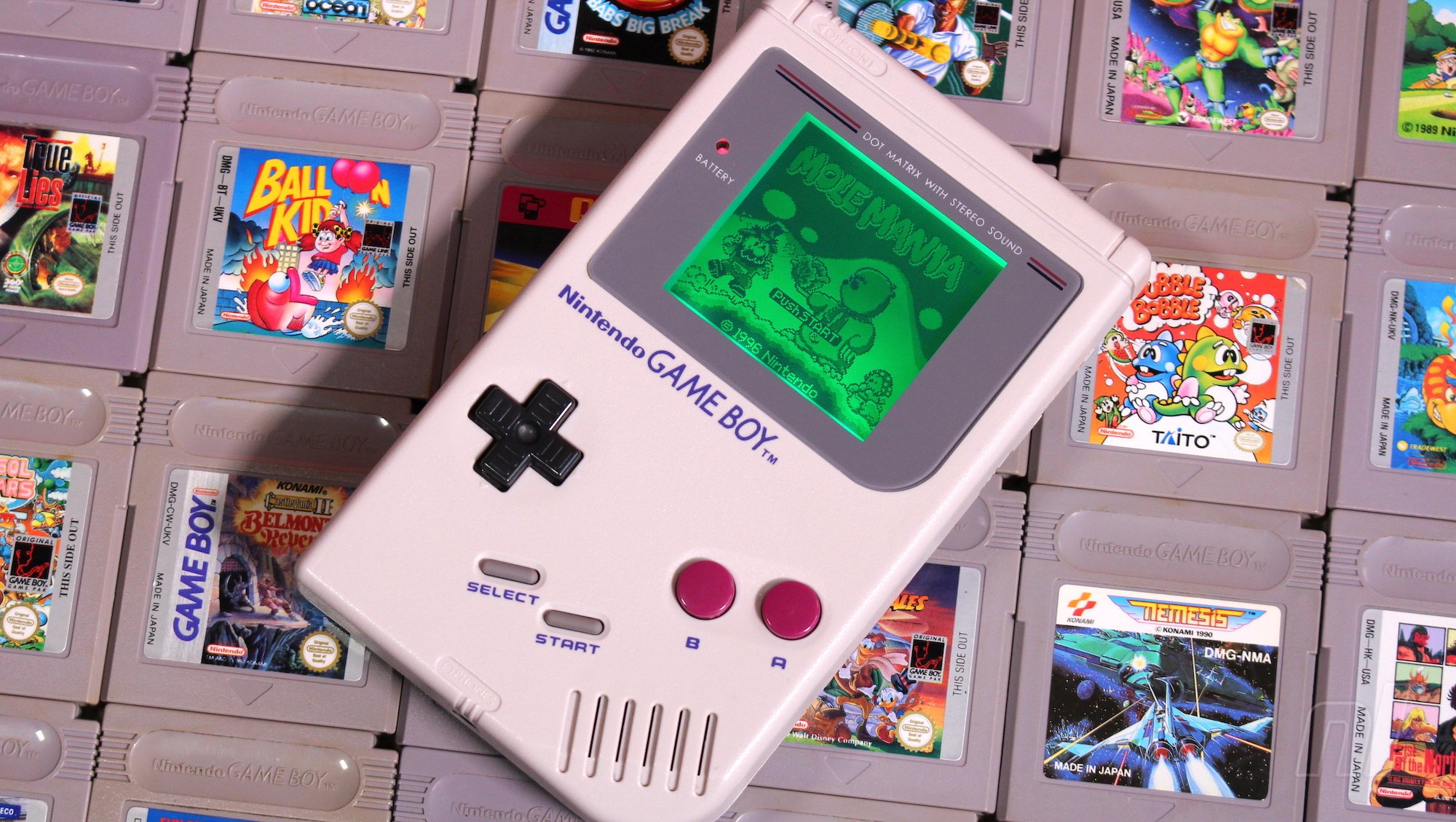
The Nintendo Game Boy turns 30 this Sunday, and to celebrate this amazing occasion we'll be running a series of related features this week, right up to the big day.

Friday 21st April 1989 – the day that the Game Boy launched in Japan. Thirty years ago today the video gaming landscape would be forever changed as Nintendo opened up the new frontier of portable gaming to the masses. The company’s Game & Watch line let you take limited gaming experiences on-the-go, but the Game Boy was a different beast entirely.

The 8-bit machine with the 160x144 pixel LCD screen might have been modest in the specs department, but it was just powerful enough to offer deep gaming experiences, with the best examples rivalling those on home consoles. More importantly, its limitations proved to be strengths in the long run; that blurry monochrome screen used significantly less power than a backlit colour equivalent, and therefore gave the portable decent battery life – an essential factor to consider when your handheld relies on AA batteries to function away from a wall socket.

Gunpei Yokoi’s design philosophy – using proven, inexpensive components in new and interesting ways – continued through Nintendo's handheld line

Primarily the work of Satoru Okada and Gunpei Yokoi, the console was designed to a specific price point and goal; to be a practical portable device. Rival companies got carried away with the technical possibilities and contemporary handheld consoles with far superior specs fell by the wayside as Game Boy marched on. Gunpei Yokoi’s design philosophy – using proven, inexpensive components in new and interesting ways – continued through Nintendo's handheld line and carried over to its home consoles with Wii. The Switch itself, and novel experiments such as Labo VR, show that this approach continues to keep the Kyoto company in rude health.

Of course, it’s software which makes or breaks any console and the humble Game Boy could never have endured so long without its catalogue of incredible games. Obviously, it had the archetypal killer app in Tetris, and many still insist it’s the finest version of Alexey Pajitnov's puzzler. The story of its convoluted journey to the console is well worth investigating – a thrilling combination of guile, subterfuge and blind luck that went on to shape Nintendo and the video game industry at large.
IMG 9820.JPG

Any video game company would be overjoyed to have a game with half the appeal of Tetris on its books, but after seven years – when you’d expect the console to be winding down – the Game Boy got the biggest second wind in video game history with the Japanese release of Pokémon Red & Green in 1996. A smaller, lighter revision of the hardware, the Game Boy Pocket, also arrived that year, and the console’s true successor – the Game Boy Color – would launch worldwide two years later alongside the western release of Pokémon. Although this marked a transition away from the OG hardware, the Game Boy line continued to enjoy almost 100% backwards compatibility up until the Micro variant of the Game Boy Advance in 2005.

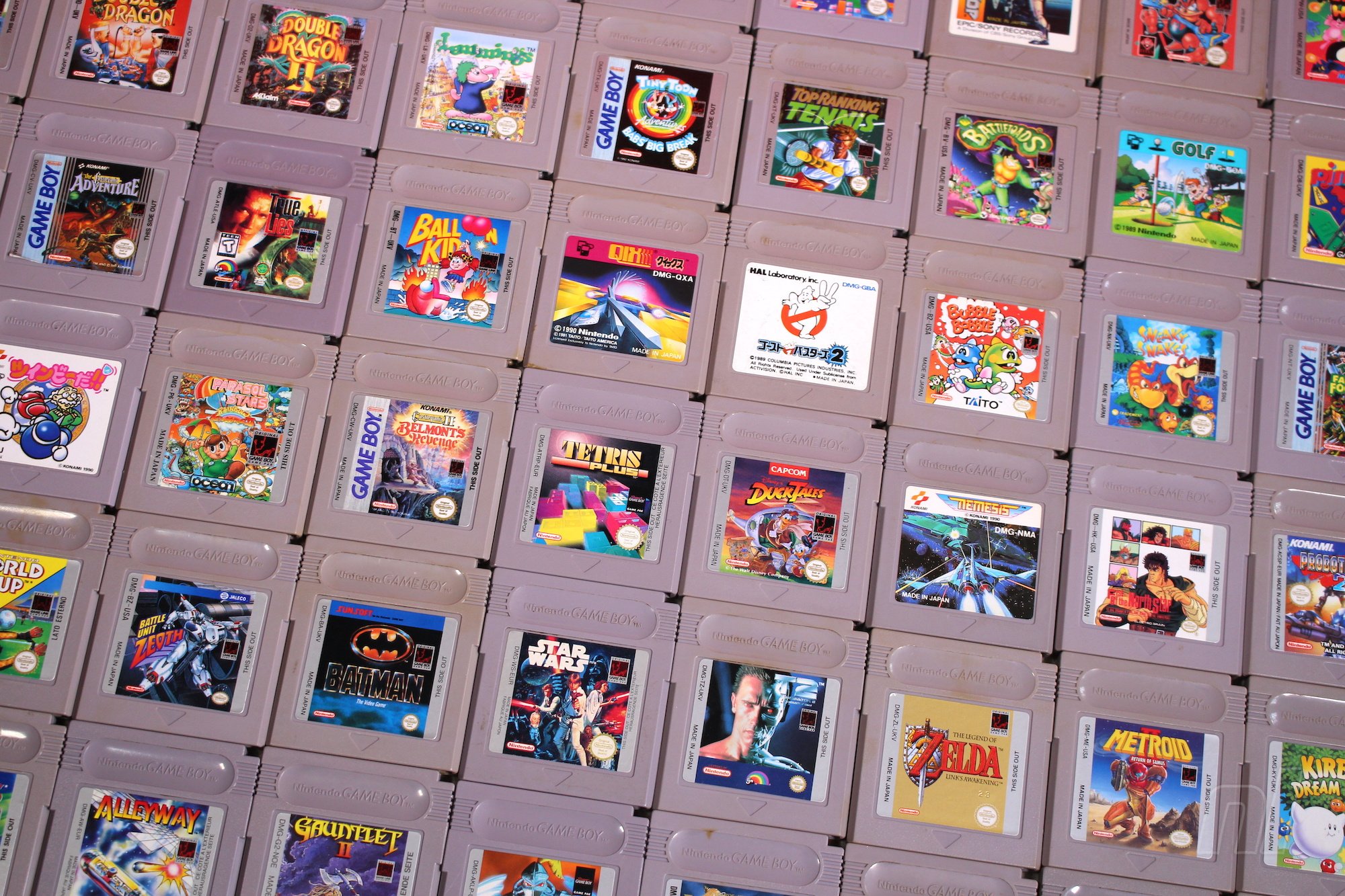
While Tetris and Pokémon were the system sellers, there’s a vast library of games released for the system

While Tetris and Pokémon were the system sellers, there’s a vast library of games released for the system. The following list showcases the very best titles. You’re sure to find lots of ‘lands’ here – someone at Nintendo HQ decreed that the diminutive handheld simply couldn’t contain massive ‘worlds’, so Super Mario Land ushered in an era of ‘Land’ games from the likes of Kirby, Donkey Kong and Wario.

As with our previous lists of the 50 best Switch games and 50 best 3DS games, the ranking here is governed by the game’s user rating on this very site - many thanks to all of you who voted for your favourites last week! Just as before, logged in users can interact and rate the titles directly on these pages by hovering over the rating, or alternatively from each game's individual page. To be clear, the games listed here are for the original Game Boy only - there are no backwards compatible 'black cart' Game Boy Color games included (unless they happened to also receive a separate release for the original). If it says 'Game Boy Color' on the box, you won't find it below!

Can't see your favourite on the list? Head to our library of Game Boy games (or click the games tab at the top of the page) and input your own ratings. We’ve reduced the eligibility from fifty votes to twenty for these vintage games, so we fully expect this to be a little more fluid than the other lists, especially in the initial stages. It’ll be fascinating to check back and see how the list evolves!

So, without further ado, let’s dive in…

Dr. Mario (GB)Dr. Mario (GB)

Publisher: Nintendo / Developer: Nintendo R&D1

Release Date: 1st Dec 1990 (USA) / 30th Apr 1991 (UK/EU)

The Game Boy port of this pill-dropping puzzler offers a decent game, although it probably isn't top of the must-have puzzler list. Unlike Tetris, where the colours of the blocks are irrelevant, Dr. Mario’s pills are a little more challenging to keep track of, especially on the original system’s blurry screen. Still, if you’re a prolific practitioner in the medical field, you could do much worse than this falling-block title with a twist.

Kwirk (GB)Kwirk (GB)

Publisher: Acclaim / Developer: Atlus

Release Date: Mar 1990 (USA) / 1990 (UK/EU)

Originally called Puzzle Boy in the east, the title character – an anthropomorphic tomato – was given a dose of ‘90s cool when he was renamed Kwirk for the west (‘He’s A-Maze-Ing!’ according to the box art...). He’s something of a Cool Spot prototype, but fortunately the game bearing his name is a winner. It involves pushing and rotating elements in the centre of a room in order to get to the other side. This can involve pushing blocks to open a path or filling pits with blocks and creating a path or switching between multiple characters and working together to get them all to the end. It’s simple and addictive stuff – two adjectives you’ll find describing the very best games on the system. Forgive Kwirk his try-hard ‘90s affectations and be sure to track him down if you can.

Mega Man III (GB)Mega Man III (GB)

Publisher: Capcom / Developer: Capcom

Release Date: 11th Dec 1992 (USA) / 11th Jun 1993 (UK/EU)

Offering gorgeous visuals, a great soundtrack, an excellent new boss, a fun new weapon and some surprising improvements on the NES originals, Mega Man III is a solid outing. The difficulty might be a bit high, but E-Tanks cushion the blow for all but the most masochistic Mega Man fans. While Dr. Wily's Revenge and Mega Man II had their respective merits, this is the first of the portable series that was a great game in its own right. Fortunately, it was by no means the last.

Bubble Bobble (GB)Bubble Bobble (GB)

Publisher: Taito Corporation / Developer: Taito Corporation

Release Date: Mar 1991 (USA) / 1991 (UK/EU)

The Game Boy port of Taito’s arcade platformer Bubble Bobble was developed in-house and it’s a great rendition of the original game that loses little in its transition to the portable’s little green screen. Bub the Bubble Dragon uses – you guessed it – bubbles to defeat enemies and work his way though 100 levels as he searches for Moon Water for his brother, Bob. It’s a classic and the GB port is an excellent way to play.

Lemmings (GB)Lemmings (GB)

Publisher: Ocean Software / Developer: DMA Design

Release Date: Aug 1994 (USA) / 1993 (UK/EU)

What is there to say? It’s Lemmings. On a Game Boy. Although it contains fewer levels and might be a little more cumbersome to control in comparison to other ports, it’s still strong version of the original game which has you manipulating the terrain to save as many of the oblivious creatures as possible. A classic, in portable form.

Game & Watch Gallery (GB)Game & Watch Gallery (GB)

Publisher: Nintendo / Developer: Nintendo R&D1

Release Date: May 1997 (USA) / 28th Aug 1997 (UK/EU)

The Game Boy was, in many ways, the natural evolution of Nintendo’s Game & Watch line of one-shot portable devices, so the ability to play those games on one cartridge seemed like an acknowledgement of that handheld legacy. If you liked the originals, this collection is a must-have. Both the originals and remakes, which combine simple gameplay and subtle strategy, are here to enjoy and the newer versions play differently enough that you're quite likely to consider them new experiences in and of themselves. The musical and visual presentation is fantastic as well, and the entire package serves as a relic of a truly magical time in gaming. Or, perhaps, two truly magical times.

Pop'n Twinbee (GB)Pop'n Twinbee (GB)

Publisher: Konami / Developer: Konami

Release Date: 1994 (UK/EU)

Known as TwinBee Da!! in Japan, Pop’n TwinBee on Game Boy is different to the game of the same name on other platforms, but it’s still an excellent slice of vertical-scrolling shoot-‘em-up in the classic TwinBee mould. It’s yet another example of an impressive portable interpretation of a classic game which relies on multiple enemies and projectiles on screen, all running on extremely modest hardware.

R-Type (GB)R-Type (GB)

Publisher: Irem / Developer: B.I.T.S.

Release Date: 1st May 1991 (USA) / 1st Dec 1991 (UK/EU)

As with any port to the Game Boy, cuts are inevitable, but this still delivers an authentic R-Type experience. A slower speed, fewer enemies on screen and the omission of two levels make for an easier version. However, this port still manages to provide a challenge and it works well on the hardware it was designed for, with good controls and clear visuals. It may be a shorter gaming experience on the Game Boy, but it's still a very good one.

Contra: The Alien Wars (GB)Contra: The Alien Wars (GB)

Publisher: Konami / Developer: Factor 5

Release Date: Oct 1994 (USA) / 1995 (UK/EU)

A Game Boy version of the SNES original, this was developed by Factor 5, the studio behind the Super Turrican games on the Super Nintendo and the Star Wars: Rogue Squadron series. The levels and overall structure were altered and a password system was added but it still manages to deliver a serviceable game of Contra on a system with the processing power of a modern day toaster.

Catrap (GB)Catrap (GB)

Publisher: ASK / Developer: Asmik Ace Entertainment

Release Date: Sep 1990 (USA) / 6th Oct 2011 (UK/EU)

Something of hidden gem in the Game Boy catalogue, Catrap is a platform puzzler credited with being the first game to have a ‘rewind’ feature. You’re tasked with defeating monsters in order to escape 100 levels of ladders, blocks and other objects. Stages get more and more devious, of course, and a level editor enables you to create your own. If it looks a little basic from the outside, the game has a giant amount of content and could keep you busy for weeks. It was arguably overlooked back in the day, but it’s an innovative puzzler that deserves a bit of attention.

Let's block ads! (Why?)


http://www.nintendolife.com/news/2019/04/feature_the_50_best_game_boy_games_-_zelda_pokemon_metroid_mario_and_more

2019-04-21 13:00:00Z
52780272011246

Lost or stolen Android phone? Here's how to get it back - CNET

It can happen in a matter of seconds: You leave your phone on a counter in the store and walk away, or someone bumps into you on the street and takes your phone right out of a pocket or bag.

Losing a phone, be it from theft or an honest mistake, is a stressful experience. Not only does it cut off your access to the rest of the world, but your phone holds some of your most personal information.

In the event your phone goes missing, don't panic! There are tools built into every Android phone that makes it possible to lock and track down a lost phone with ease. But first, you'll need to take some steps to set yourself up for success.

Now playing: Watch this: How to find your lost Android phone

3:01

Be prepared

Create a secure lock screen

Do yourself a favor and turn on passcode and fingerprint authentication. Do yourself another favor and don't use facial recognition on your Android device.

The technology used for facial recognition on most Android devices can be easily tricked with something as simple as a photo of your face. Facial authentication could get more secure if Android Q does indeed add official support for secure Face ID-like authentication to Android as reports have suggested.

Next. create your passcode and set up fingerprint authentication in the Settings app under the Security section. I realize scanning a fingerprint or entering a PIN code every time you want to use your phone can be inconvenient, but the idea of someone having access to your photos, banking apps, email and the rest of your personal info is downright scary.

An extra step to unlock your phone is worth the effort when you consider the potential impact of exposing your personal info to a stranger.   

Google's Find My Device

google-find-my-device

Make sure Google's Find My Device is turned on. 

Screenshots by Jason Cipriani/CNET

Any time you sign into an Android device with a Google account, Find My Device is already on. Find My Device is what you'll use should your phone ever go missing to track, remotely lock and remotely erase it. 

You can check to make sure Find My Device is enabled by opening the Settings app and going to Security & Location > Find My Device. Alternatively, if your device doesn't have a Security & Location option, go to Google > Security > Find My Device.

Find My Device should be turned on. If not, slide the switch to the On position and exit out of the Settings app.

Samsung's Find My Mobile

samsung-find-my-mobile

If you've signed in to your Samsung account on a Galaxy phone, you should be good to go. However, it's a good idea to double check. 

Screenshots by Jason Cipriani/CNET

If you have a Samsung phone, then in addition to Google's Find My Device service, you can -- and should -- set up Samsung's Find My Mobile service. Not only does it give you a backup service to track down a lost phone, but it also gives you tools that Find My Device doesn't have.

With Samsung's service, you can do things like force remote backups or see if someone has swapped out your SIM card. You must have a Samsung account to use Find My Mobile.

On your Samsung phone, open the Settings app and go to Biometrics and security > Find My Mobile. If you signed into your Samsung account during the initial device setup, the Find My Mobile should already be enabled. If not, take a few seconds to sign into your Samsung account and enable Find My Mobile.

Remotely lock, track a lost phone

Use Find My Device

Play a sound, lock your phone or erase it using the Find My Device site. 

Screenshot by Jason Cipriani/CNET

Using Android's baked-in service requires you to remember one thing: android.com/find. That website is where you'll go in the unfortunate event that you lose your phone. Make sure you sign in to the same Google account that's linked to your Android phone.

Not near a computer? You can use another Android device and the Find My Device app that you'll have to download separately from the Play store. Immediately after signing into the site or app, Google will attempt to locate your phone.

An alert will be sent to your phone to tell whoever has it that it's being tracked. Use the menu on the left-hand side of the Find My Device site to play a sound (helpful if you misplaced it in your home!), lock down your device, or erase the device altogether.

Selecting Secure Device will lock the phone, display a message of your choosing on the lock screen, and sign out of your Google account. Don't worry, you can still locate the phone after it's locked. If you use Google Pay for mobile payments, locking your phone will prevent anyone from using your phone to make a purchase.

If you use the Erase Device feature, you will no longer be able to track the phone once it's erased. Reserve this feature as a last resort.

Should the thief turn off your phone, you won't be able to track it until it's turned back on and has a cellular or Wi-Fi connection. Google will send you an email once it locates your device.

Samsung users

Samsung's Find My Mobile has a lot of options to track and control a lost phone. 

Screenshot by Jason Cipriani/CNET

Samsung Galaxy owners have the benefit of using Google's or Samsung's respective services to locate a lost device, but I recommend using Samsung's offering. As you'll see below, the added capabilities are invaluable.

To track a lost device with Samsung's service, you need to visit findmymobile.samsung.com. There isn't a companion app, so you'll need to use a mobile browser on another phone or a computer.

Sign in with your Samsung account, then select your lost device on the left side of the screen. A map will display where your phone is currently located, and a menu of options will show up on the right side of the screen.

Start by locking the phone, which will display a personalized message on the lock screen, suspend your Samsung Pay cards, and prevent the phone from being powered off.

Next, create a backup of your phone. Should you lose it for good, you'll want to have a current backup of your phone. If the phone is moving locations, use the Track location feature.

Enabling this feature will track your phone every 15 minutes. Finally, turn on the Extend battery life feature -- this will disable almost everything on the phone, outside of the location tracking.

Don't confront thieves

If your phone has been stolen and you're able to track its location, do not attempt to recover it yourself. Doing so could lead to you or someone else getting hurt, and despite the importance of a phone, it's simply not worth it.

Instead, contact local law enforcement and let them know you need help recovering a lost or stolen phone that you've been able to track to a specific address.

Contact your carrier, file an insurance claim

Google Pixel 3 and Pixel 3 XL

Contact your carrier to file an insurance claim as soon as you realize you aren't getting your phone back. 

Sarah Tew/CNET

If it becomes clear that you're never going to get your phone back, contact your carrier and report your phone as lost or stolen. Doing this will blacklist the phone from the carrier's database, preventing another person from using it.

When you call, your carrier will want to suspend your service as well. This is a good idea if you want to prevent someone from using your phone. However, keep in mind that if you're still tracking your lost phone, you'll lose a mobile connection to it --  and unless the phone is somehow registered on a Wi-Fi network, you'll lose the ability to track it.

Finally, if you pay for insurance on your phone, you'll need to file a claim and pay the deductible to get your replacement phone. Get the insurance claim process started through your carrier, who will then likely refer you to the third-party insurance company who will replace your phone.

Good luck! We hope you never have to go through the emotional roller coaster of losing a phone, tracking it down, and trying to get it back. 

Let's block ads! (Why?)


https://www.cnet.com/how-to/lost-or-stolen-android-phone-heres-how-to-get-it-back/

2019-04-21 12:00:06Z
CAIiEGDOgXAeMKlVscuOfo0_HWIqFQgEKgwIACoFCAow4GowoAgwhuCMBg

AI generates non-stop stream of death metal - Engadget

AarStudio via Getty Images

There's a limit to the volume of death metal humans can reproduce -- their fingers and vocal chords can only handle so much. Thanks to technology, however, you'll never have to go short. CJ Carr and Zack Zukowski recently launched a YouTube channel that streams a never-ending barrage of death metal generated by AI. Their Dadabots project uses a recurrent neural network to identify patterns in the music, predict the most common elements and reproduce them.

The result isn't entirely natural, if simply because it's not limited by the constraints of the human body. There are no real pauses. However, it certainly sounds the part -- you'll find plenty of hyper-fast drums, guitar thrashing and guttural growling. In a chat with Motherboard, Carr noted that death metal's rapid-fire pace is ideal for this as it creates more consistent output than you'd get with other, slower genres.

You're not about to see robots replacing death metal musicians on stage. That's not to say this is the end of the line. Carr and Zukowski hope to add audience interaction with Dadabots, so there might be a day when you can steer the AI's output and satisfy your exact tastes in heavy-sounding tunes.

Let's block ads! (Why?)


https://www.engadget.com/2019/04/21/ai-generated-death-metal-stream/

2019-04-21 09:01:04Z
CAIiEIV2NEs5bERiXjUYbPz1hO0qGAgEKg8IACoHCAowwOjjAjDp3xswiOOvAw

AI generates non-stop stream of death metal - Engadget

AarStudio via Getty Images

There's a limit to the volume of death metal humans can reproduce -- their fingers and vocal chords can only handle so much. Thanks to technology, however, you'll never have to go short. CJ Carr and Zack Zukowski recently launched a YouTube channel that streams a never-ending barrage of death metal generated by AI. Their Dadabots project uses a recurrent neural network to identify patterns in the music, predict the most common elements and reproduce them.

The result isn't entirely natural, if simply because it's not limited by the constraints of the human body. There are no real pauses. However, it certainly sounds the part -- you'll find plenty of hyper-fast drums, guitar thrashing and guttural growling. In a chat with Motherboard, Carr noted that death metal's rapid-fire pace is ideal for this as it creates more consistent output than you'd get with other, slower genres.

You're not about to see robots replacing death metal musicians on stage. That's not to say this is the end of the line. Carr and Zukowski hope to add audience interaction with Dadabots, so there might be a day when you can steer the AI's output and satisfy your exact tastes in heavy-sounding tunes.

Let's block ads! (Why?)


https://www.engadget.com/2019/04/21/ai-generated-death-metal-stream/

2019-04-21 08:56:46Z
CAIiEIV2NEs5bERiXjUYbPz1hO0qGAgEKg8IACoHCAowwOjjAjDp3xswiOOvAw

AI generates non-stop stream of death metal - Engadget

AarStudio via Getty Images

There's a limit to the volume of death metal humans can reproduce -- their fingers and vocal chords can only handle so much. Thanks to technology, however, you'll never have to go short. CJ Carr and Zack Zukowski recently launched a YouTube channel that streams a never-ending barrage of death metal generated by AI. Their Dadabots project uses a recurrent neural network to identify patterns in the music, predict the most common elements and reproduce them.

The result isn't entirely natural, if simply because it's not limited by the constraints of the human body. There are no real pauses. However, it certainly sounds the part -- you'll find plenty of hyper-fast drums, guitar thrashing and guttural growling. In a chat with Motherboard, Carr noted that death metal's rapid-fire pace is ideal for this as it creates more consistent output than you'd get with other, slower genres.

You're not about to see robots replacing death metal musicians on stage. That's not to say this is the end of the line. Carr and Zukowski hope to add audience interaction with Dadabots, so there might be a day when you can steer the AI's output and satisfy your exact tastes in heavy-sounding tunes.

Let's block ads! (Why?)


https://www.engadget.com/2019/04/21/ai-generated-death-metal-stream/

2019-04-21 08:55:31Z
CAIiEIV2NEs5bERiXjUYbPz1hO0qGAgEKg8IACoHCAowwOjjAjDp3xswiOOvAw

Deal: Best Buy kicks off Easter Flash Sale with massive discounts on iPad Pro - Phone Arena

Best Buy is running a flash sale that will last for just one day. The Easter Flash Sale offers major discounts on multiple Apple products, including iPads, iPhone, iMacs and MacBooks, but you'll have to hurry if want to score a good deal since the sale ends Sunday, April 21 at 11:59 pm.

The US retailer offers exceptional discounts on the iPad Pro, as both 11-inch and 12.9-inch models are on sale for up to $200 off. As a matter of fact, with a few exceptions, all iPad Pro variants are $200 cheaper until the end of the day.

Also, if you haven't been subscribed to Apple Music before, you'll also receive free Apple Music for 3 months. You'll also get to choose between two color options (Silver and Space Gray) and four memory sizes (64GB, 256GB, 512GB and 1TB).

If you plan to buy an iPad Pro that features cellular connectivity, you'll be able to get it on monthly payments with one of the three major carriers – AT&T, Sprint, and Verizon. If you choose unlocked, you'll have to pay the full price upfront, so there's plenty of choices to think about, but not enough time.

Let's block ads! (Why?)


https://www.phonearena.com/news/Deal-Best-Buy-Easter-Flash-Sale-massive-discounts-iPad-Pro_id115464

2019-04-21 08:52:28Z
52780272915813

Case molds confirm iPhone 11 and iPhone 11 Max rumors - PocketNow

The images you see above and below have been posted on Weibo and reposted by Slashleaks, and they allegedly depict a third party case-maker’s case molds for the 2019 iPhones. Accessory makers are building these molds based on technical drawings and specific measurements in order to create cases that will fit phones, sometimes even without having access to the phones.

The image showing the back reveals the triple-camera setup, but with a slight twist: it looks like the camera lenses will be slightly larger than the LED flash, opposed to what we’ve seen leaked and rendered so far. Or, since the entire part of the camera will be a cutout in the cases, it is just an exaggeration in the mold design.

A recent report suggested that the added third lens will be a 12MP super-wide angle lens, complementing the current main camera and telephoto lens setup. The image of the front (below) doesn’t seem to showcase any design changes, despite some reports claiming that Apple might be narrowing the notch down a little bit.

We’ll add this to the roster or rumors and leaks of the iPhone 11 and iPhone 11 Max, and we’ll keep you posted as soon as something new pops-up.

iPhone 11

Discuss This Post

Let's block ads! (Why?)


https://pocketnow.com/iphone-11-max-rumors

2019-04-21 06:00:00Z
52780272926247