Jumat, 12 April 2019

How to use your Android phone as a two-factor authentication security key - The Verge

Google added a new way to verify your logins this week: using your Android phone as a physical security key for two-factor authentication. You should be using two-factor authentication to log onto websites, so that even if someone has your password from a data breach, they won’t be able to get in. And now with the new feature, if you have an Android phone running 7 or higher, you also have a convenient security key.

It’s more secure than many existing 2FA options (such as using SMS) because your phone will check in with your computer via Bluetooth to make sure you’re on the correct website and not being phished. SMS can be hacked, and most other secondary methods of verifying your logins won’t be able to check you’re attempting to log on to the right site.

Your computer should be running Windows 10, macOS, or Chrome OS, with any version of Chrome 72 or later. (Interestingly, Google doesn’t let you set this up via a mobile device, so you can’t use one phone to set up another phone as a key.) Before you start, make sure that your phone has Bluetooth turned on.

Here’s how to set it up:

  • If you haven’t yet, make sure to add a Google account to your phone by heading into Settings > Accounts > Add account > Google.
  • Then, on your computer, open a Google Chrome browser.
  • Head into myaccount.google.com/security on Chrome and click on “2-Step Verification.”
  • If you don’t have two-step verification set up yet, enter this site, and follow these instructions. The TL;DR is that you’ll need to log in, enter a phone number, and select what secondary methods of verification you’d like, which brings us back to...
  • Scroll down the list of secondary methods and select “Add Security Key.”
  • Choose your phone from the list of options; it should automatically show up.

That’s it! You’ve set up your phone as a security key and can now log in to Gmail, Google Cloud, and other Google services and use your phone as the secondary method of verification. Just make sure your phone is in close proximity to your computer whenever you’re trying to log in. Your computer will then tell you that your phone is displaying a prompt. Tap on the prompt to verify your login and you’re all set!

Here are some screenshots of what it looks like when you’re prompted on your phone to verify a login. It’s similar to what Google Prompt looks like already, with the main difference being that your phone will be checking with the website to verify it’s the right one.

Vox Media has affiliate partnerships. These do not influence editorial content, though Vox Media may earn commissions for products purchased via affiliate links. For more information, see our ethics policy.

Let's block ads! (Why?)


https://www.theverge.com/2019/4/12/18306930/how-to-android-phone-two-factor-authentication-security-key-login

2019-04-12 18:33:58Z
CAIiEIax_vVcjkMwto68ID6xXZAqFwgEKg4IACoGCAow3O8nMMqOBjDt2egF

God Eater 3 - Announcement Trailer - Nintendo Switch - Nintendo

Let's block ads! (Why?)


https://www.youtube.com/watch?v=qYdkCxuFUHc

2019-04-12 17:30:01Z
52780267132157

Galaxy S10 update aims to fix ultrasonic fingerprint issues, March 2019 patch rolling out - 9to5Google

The ultrasonic fingerprint reader on the Samsung Galaxy S10 was said to be the most accurate and fastest version of in-display scanners on the market, but that doesn’t seem to have been the case from day one.

Complaints of poor performance, slow unlock speeds, and issues with fingerprint recognition overall have been common on communities such as /r/GalaxyS10. Samsung has listened to these complaints and is now pushing out an update that is said to help resolve many of these issues with the in-display fingerprint reader.

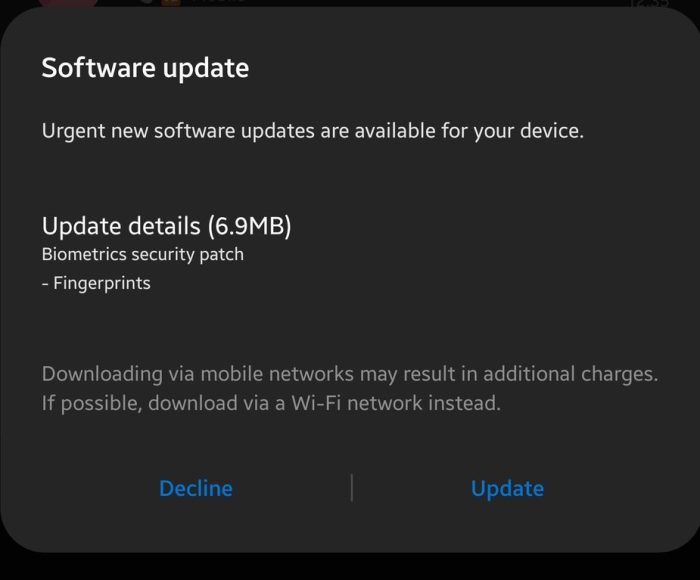
The update measures in at just 6.9MB and is solely a patch for the biometrics on the Galaxy S10 and S10+. Rather than a full OS update or standard OTA the update comes via the Fingerprint app found on Galaxy devices.

Version 2.0.8.4 should help you with any unlocking woes, make the ultrasonic fingerprint scanner more responsive and overall a better experience. Naturally, this update will rollout in stages like always, so it may not be ready for your device just yet.

We’re unsure though if this update will be able to do anything about the ability to 3D print your fingerprint and essentially trick your Galaxy S10 into unlocking. If any adventurous 3D printer owners want to give it a go, who are we to argue.

Samsung Galaxy S10 fingerprint

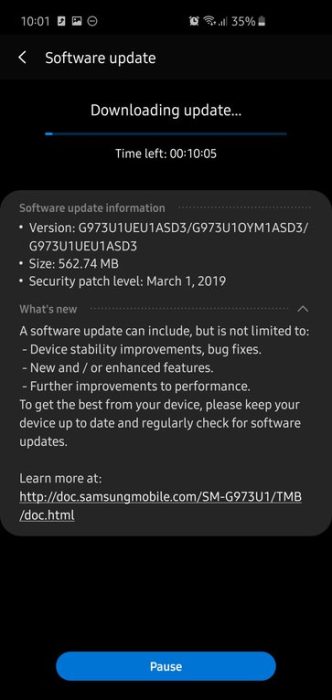
Not only are the fingerprint issues hopefully being resolved, unlock US Galaxy S10 users can expect to see the March 2019 security patch along with bug fixes and performance enhancements rolling out over the coming days.

While the update is a little overdue, it brings much-needed security to Galaxy S10 devices. Firmware versions G973U1EU1ASD3, G973U1OYM1ASD3, and G973U1UEU1ASD3 should now be available to download and weigh in at 563MB. It’s worth noting that this update does not bring biometric fixes — this is a completely separate download.

If you’ve managed to get either update for your Galaxy S10 device, be sure to let us know in the comments section below.

More on Samsung:


Check out 9to5Google on YouTube for more news:

Let's block ads! (Why?)


https://9to5google.com/2019/04/12/galaxy-s10-fingerprint-issues/

2019-04-12 14:07:00Z
52780266264475

Prevent Amazon From Eavesdropping On Your Alexa Conversations - Lifehacker

Photo: Fabian Hurnaus (Pexels)

Fun fact: Snippets of your Alexa conversations may be heard and read by thousands of Amazon employees. According to recent reports, Amazon has an international team of employees who work to help Alexa better understand your many commands and develop new ways for the AI to interact with users. This requires them to listen to snippets of what your Echo speakers and other Alexa devices are recording. Sounds eerily familiar to us.

Not only are real people listening to you talk to (and around) Alexa, but the conversations they listen in on are being transcribed and annotated by Amazon’s employees. These transcriptions are then used to “teach” the Alexa AI to recognize more commands.

Advertisement

If you’re sketched out by this, we understand. Especially since what you say is only kind-of, sort-of associated with your account, as Bloomberg describes:

“A screenshot reviewed by Bloomberg shows that the recordings sent to the Alexa reviewers don’t provide a user’s full name and address but are associated with an account number, as well as the user’s first name and the device’s serial number.”

While you’ll never be able to stop Amazon employees from listening in on whatever you say to your Alexa, you can at least turn off any features that make this easier. For example:

  1. Open the Alexa mobile app
  2. Tap the Menu button in the upper-left of the screen
  3. Go to Alexa Account > Alexa Privacy > Manage how your data improves Alexa
  4. Turn off “Help develop new features” and “Use messages to improve transcriptions” for all profiles on your account

Advertisement

Bloomberg notes that Amazon’s team might still analyze your Alexa recordings “by hand,” but this at least opts you out of some facet of Amazon’s voice study. The only real solution at this point is to ditch your Amazon devices altogether, but adjusting these privacy settings should hopefully help keep unnecessary third parties out of your business a little bit.

Let's block ads! (Why?)


https://lifehacker.com/prevent-amazon-from-eavesdropping-on-your-alexa-convers-1833974108

2019-04-12 13:30:00Z
52780267194759

Facebook takes next step in plans for unified messaging service to rival iMessages - 9to5Mac

Facebook has taken the next step in its plans to unify its Messenger, WhatsApp and Instagram messaging apps into a single, unified messaging service. The result would be something likely to rival iMessage as an ultra-convenient one-stop messaging option …

NordVPN

We first heard back in January that Facebook was planning to combine its own messaging service with those of the apps it acquired: WhatsApp and Instagram. At that point, Facebook appeared to confirm the report.

Later than month, CEO Mark Zuckerberg confirmed during an earnings call that it is something the company is ‘considering,’ but that it would not happen this year.

Developer Jane Manchun Wong, who has made a name for herself reverse-engineering a range of apps to spot upcoming features, spotted a sign that the company is already prepping for the move.

What she found supports earlier suggestions about how this would work: you would still see separate icons on your device for the different messaging service, but they would all feed into the same system. In this case, opening Messenger would open the main Facebook app in chat mode.

Wong said that things appear to be at a relatively early stage as yet.

For now, this new “Chats” section seems to only contain the basic chat functionalities. To give message reactions, make a call, send photos, etc, you’d still have to open the Messenger app

Her screenshots also indicate that Facebook is preparing the main Facebook App to have a similar white-dominated appearance similar to the Messaging app, losing the strong blue theme long associated with the social network.

My own anecdotal evidence is that even when all involved in a chat have iPhones, there’s been an increasing tendency for people to begin group chats in Facebook Messenger or WhatsApp, suggesting that a unified messaging service would likely serve as a default choice for many in much the same way iMessage has historically via its integration with text messages.

What’s been your experience? Do your family and friends default to iMessage, or to a rival service? Let us know in the comments.

Via The Verge

ESR iPad Accessories

Let's block ads! (Why?)


https://9to5mac.com/2019/04/12/unified-messaging-service/

2019-04-12 11:49:00Z
52780266987466

Facebook is exploring a change to its main app that users might actually enjoy - Phone Arena

Facebook's strategy to achieve world domination with multiple social networking services and messaging apps hasn't always been very coherent and predictable, but it seems Mark Zuckerberg wants to bring together the resources and capabilities of Messenger, Instagram, and WhatsApp soon enough.
Considering this controversial plan that's sending shivers down the spine of privacy advocates while no doubt also facing scrutiny from regulatory bodies around the world, it's certainly not surprising to hear the main Facebook mobile app could regain its messaging functionality before long. The change is already being internally tested, according to Jane Manchun Wong, a Twitter user that's been making serious waves of late with her abilities to uncover unreleased features in beta versions of popular services like Facebook.

Of course, this doesn't necessarily mean a public comeback of the app's "Chats" section is right around the corner. In fact, the feature may never return to the masses, as companies often try out many different things behind closed doors that don't ultimately materialize. But given Zuckerberg's reported intention to merge Messenger, Instagram, and WhatsApp, we're ready to bet this is one of those things that will move out of testing and in the public eye relatively quickly.

It's also one of the few features that could come out of this app unification that users actually seem excited about. For the time being, it looks like the "Chats" section inside the main Facebook app only contains "basic" messaging functionalities. Namely, the ability to send and receive messages, while reactions, calls, and photos might remain exclusive to Messenger. Unless of course this is still early days of testing and Facebook plans to bring every little aspect of Messenger to its core app later on. 
By the way, this absolutely does not mean the standalone Messenger app is going away. As of last September, 1.3 billion people around the world used that product every month after a 2011 launch and a 2014 split from the main Facebook app. While there's obviously major overlap between the two's user bases, some folks probably prefer to keep the tools separate or only use one. Facebook is likely to respect that going forward.

Let's block ads! (Why?)


https://www.phonearena.com/news/facebook-app-messenger-functionality-comeback-testing_id115244

2019-04-12 10:22:03Z
52780266987466

This four-inch antenna could let you text from deep underground - Engadget

Dawn Harmer/SLAC National Accelerator Laboratory

There's a reason that scuba divers use sign language and that caves and tunnels create radio dead zones. The laws of physics prevent radio signals from penetrating materials like water, soil and stone, and that's been a frustrating limitation of modern wireless communication. Now, the Department of Energy's SLAC National Accelerator Laboratory might have a solution: a four-inch-tall, pocket-sized antenna that emits very low frequency (VLF) radiation.

Unlike radio waves, which are used for radio broadcasts, radar and navigation systems, VLF radiation wavelengths can travel thousands of miles beyond the horizon and hundreds of feet through the ground and water. This isn't the first time VLF radiation has been used to break through physical barriers. But the new antenna is much smaller and could be used to build transmitters that are only a few pounds. That makes it appealing for military rescue and defense missions.

The SLAC-led team shared its work in Nature Communications today. According to SLAC, in tests, the new antenna produced VLF radiation 300 times more efficiently than previous compact antennas and transmitted data with almost 100 times more bandwidth. That could enable data transfer rates of more than 100 bits per second -- enough to send a simple text. While that might not sound like much, it could make life-saving communication with submarines and deep bunkers or mines possible.

Let's block ads! (Why?)


https://www.engadget.com/2019/04/12/slac-antenna-vlf-radiation/

2019-04-12 09:00:31Z
CAIiEK7F7aG4YKSZxlf-bsFHCMgqGAgEKg8IACoHCAowwOjjAjDp3xswicOyAw